nf-core/pacvar
Longread PacBio sequencing processing for WGS and PureTarget
Introduction
This document describes the output produced by the pipeline. Most of the plots are taken from the MultiQC report, which summarises results at the end of the pipeline.
The directories listed below will be created in the results directory after the pipeline has finished. All paths are relative to the top-level results directory.
Pipeline overview
The pipeline is built using Nextflow and processes data using the following steps:
- Demultiplex and alignment
- lima - Demultiplex samples
- pbmerge - Merge input BAM with failed BAM if specified in the sample sheet
- pbmm2 - Align samples to reference genome
- SAMTools sort - Sort BAM files
- SAMTools index - Index BAM files
- WGS workflow
- DeepVariant - Variant call SNVs
- GATK4 Haplotypecaller - Variant call SNVs
- pbsv - Variant call SVs
- tabix - VCF zipping
- bcftools index - Index VCF files
- Sawfish - Variant call SVs and CNVs
- HiPHASE - Phase VCF, and BAM files
- SAMTools index - Index BAM file
- HiFiCNV - Variant call CNVs
- pb-CpG-Tools - per-CpG methylation scores and pileup
- Repeat workflow
- TRGT - Genotype and plot tandem repeats
- SAMTools sort - Sort BAM files
- SAMTools index - Index BAM files
- bcftools index - Index VCF files
- MultiQC
- Pipeline information - Report metrics generated during the workflow execution
When --skip_demultiplexing is false (default behavior)
lima
Output files
lima/<sample><barcode-pair>.bam: The demultiplexed bamfiles<basename>.bam.pbi: The Pacbio index of bam files<sample>.lima.counts: Counts of the number of reads found for each demultiplexed sample<sample>.lima.report: Tab-separated file about each ZMW (Zero-Mode Waveguide), unfiltered<sample>.lima.summary: File that shows how many ZMWs (Zero-Mode Waveguide) have been filtered, how ZMWs many are same/different
Note:
- If
--skip_demultiplexingis true:<basename> = <sample> - If
--skip_demultiplexingis false:<basename> = <sample>.<barcode-pair>
lima is a PacBio tool for demultiplexing HiFi sequencing data by identifying and trimming barcode sequences, producing per-sample BAM files and associated demultiplexing reports.
pbmm2
Output files
pbmm2/<basename>.aligned.bam: Aligned BAM
pbmm2 aligns PacBio HiFi reads to a reference genome using a minimap2-based algorithm optimized for long reads.
SAMTools
Output files
samtools/<basename>.sorted.bam: The sorted BAM file.<basename>.sorted.bam.bai: The indexed BAM file.
SAMTools Sort and index aligned bams.
GATK4 HaplotypeCaller
Output files
gatk4/<basename>.snv.vcf.gz: VCF of the SNV<basename>.snv.vcf.gz.tbi: Associated indexes for the VCF files
GATK4 HaplotypeCaller is a variant caller for identifying small variants (SNVs and small indels) from high-throughput sequencing data.
DeepVariant (rundeepvariant)
Output files
deepvariant/<basename>.snv.vcf.gz: Zipped VCF file<basename>.snv.vcf.gz.tbi: Associated index to zipped VCF file
DeepVariant is a deep learning–based variant caller that identifies small variants (SNVs and small indels) from high-throughput sequencing data. In this workflow, we use the rundeepvariant wrapper provided by DeepVariant to perform variant calling in a standardized and reproducible manner.
pbsv
Output files
pbsv/<basename>.sv.vcf: VCF of SV<basename>.svsig.gz: File containing signatures of structural variants
pbsv is a PacBio structural variant caller for long-read sequencing data. Note: In recent PacBio HiFi analysis workflows (HiFi WGS WDL pipeline 3.0.0), pbsv has been replaced by Sawfish, which integrates structural variant and copy number variant calling and is now the recommended SV caller for HiFi data.
Sawfish
Sawfish discover
Output files
sawfish/<basename>/<basename>_discoverysv_candidates.vcf.gz: Per-sample structural variant candidate calls from haplotype assembly.sv_candidates.vcf.gz.tbi: Tabix index for SV candidates VCF.contig.alignment.bam: Assembled haplotype contigs aligned to the reference genome.contig.alignment.bam.csi: CSI index for the contig alignment BAM.assembly.regions.bed: Genomic regions where local assembly was performed.copynum.bedgraph: Preliminary copy number estimates in bedGraph format.copynum.mpack: Copy number data in MessagePack binary format.depth.mpack: Depth coverage data in MessagePack format.maf.mpack: Minor allele frequency data in MessagePack format ifskip_snp=false.expected.copy.number.bed: Expected copy number for genomic regions (e.g., sex chromosomes).max.depth.bed: Regions with maximum depth thresholds.genome.gclevels.mpack: GC content levels across the genome.sample.gcbias.mpack: Sample-specific GC bias correction data.discover.settings.json: Configuration file with input paths and parameters.run.data.json: Runtime data and statistics.run.stats.json: Summary statistics from the discover run.sawfish.log: Detailed log file from the discover step.debug.breakpoint_clusters.bed: Debug output showing breakpoint cluster locations.debug.cluster.refinement.txt: Debug output with cluster refinement details.
Sawfish joint-call
Output files
sawfish/<basename>/<basename>_jointcallgenotyped.sv.vcf.gz: Integrated structural variant and copy number variant calls in VCF format.genotyped.sv.vcf.gz.tbi: Tabix index for the joint-called VCF.contig.alignment.bam: Merged contig alignments from all samples.contig.alignment.bam.csi: CSI index for the contig alignment BAM.run.stats.json: Summary statistics from the joint-call run.sawfish.log: Detailed log file from the joint-call step.
Sawfish is a joint structural variant (SV) and copy number variant (CNV) caller for mapped HiFi sequencing reads. It uses a two-step workflow: a per-sample discover step that identifies SV candidates through local haplotype assembly, followed by a joint-call step that merges, genotypes, and integrates SV and CNV calls across one or more samples.
HiPhase
Output files
hiphase/<basename>.snv.phased.bam: Haplotagged BAM - outputted from phasing based on SNV<basename>.snv.phased.bam.bai: Haplotagged BAM index<basename>.sv.phased.bam: Haplotagged BAM - outputted from phasing based on SV<basename>.sv.phased.bam.bai: Haplotagged BAM index<basename>.snv.phased.vcf: The phased Variant File (SNV) (Zipped)<basename>.sv.phased.vcf: The phased Variant File (SV) (Zipped)<basename>.snv.stats.csv: This CSV/TSV file contains information about the the phase blocks that were output by HiPhase (SNV)<basename>.sv.stats.csv: This CSV/TSV file contains information about the the phase blocks that were output by HiPhase (SV)
HiPhase performs haplotype phasing of small variants and structural variants from PacBio HiFi sequencing data, generating phased VCFs and haplotagged BAM files for downstream haplotype-aware analyses.
tabix
tabix VCF file handler - VCF zipping.
Output files
tabix/<basename>.sv.vcf.gz: Zipped PBSV VCF files
tabix VCF file handler - VCF zipping.
bcftools index
Output files
BCFTOOLS/<basename>.sv.vcf.gz.csi: Index of PBSV VCF files
bcftools manipulates VCF files including Indexes them
TRGT
TRGT is a PacBio-developed software for genotyping and plot tandem repeats for HiFi long-read sequencing data.
Output files
trgt/<basename>.bam.vcf.gz: VCF file for the repeat region<basename>.bam.spanning.bam: BAM for the repeat region<basename>.png: Waterfall plot of the repeat region
Example png output: sample1_C9ORF72.png
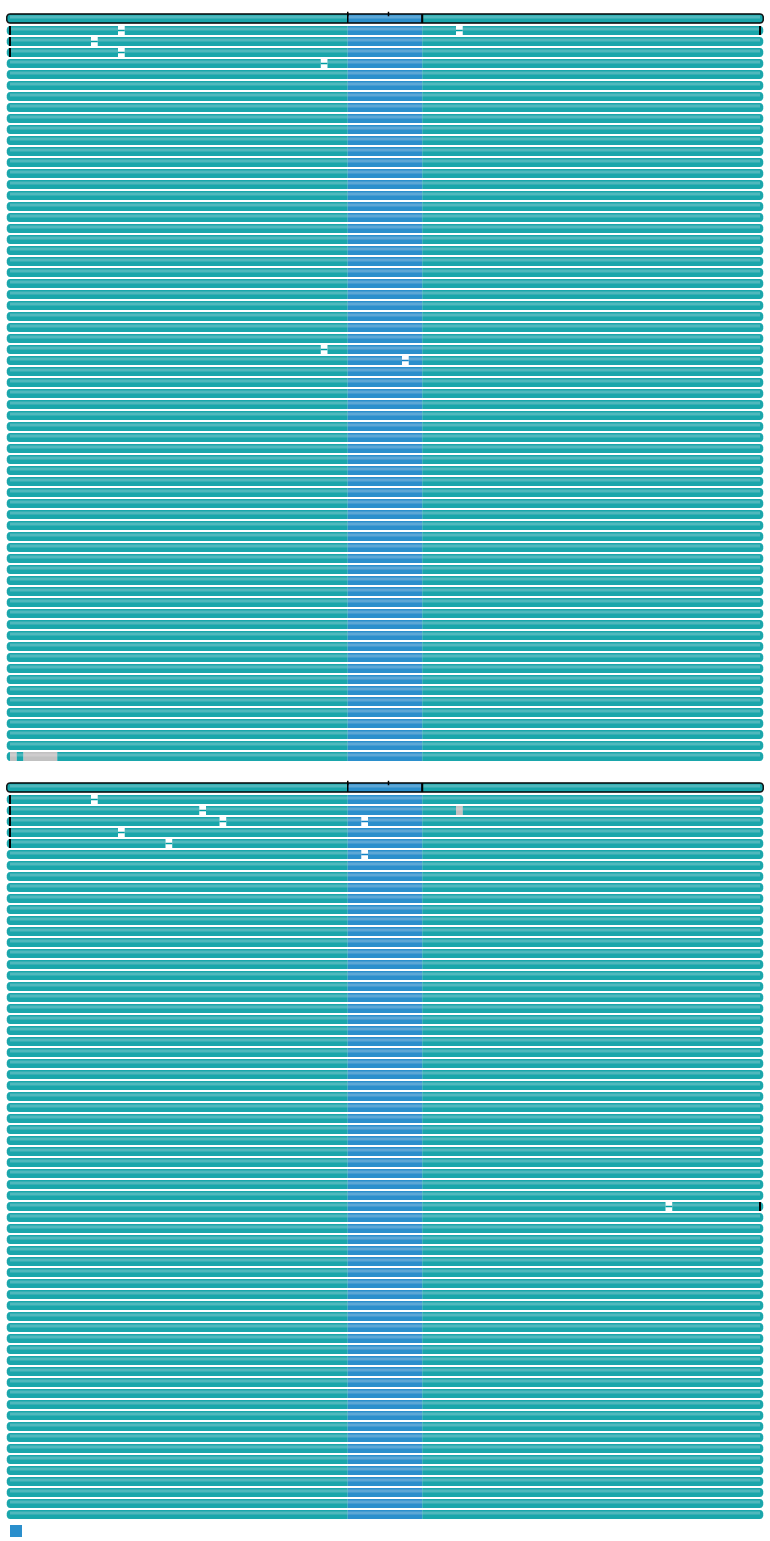
TRGT is a PacBio-developed software for genotyping and plot tandem repeats for HiFi long-read sequencing data.
pbmerge
Output files
- `pbmerge/` - `pbmerge is a PacBio utility used to merge multiple BAM files into a single BAM file while preserving PacBio-specific metadata.
HiFiCNV
Output files
-
hificnv/<basename>.cnv.<id>.vcf.gz: Copy number variant calls in VCF format with copy number estimates, confidence intervals, and quality scores.<basename>.cnv.<id>.copynum.bedgraph: Copy number segmentation results in bedGraph format with copy number values for each genomic region.<basename>.cnv.<id>.depth.bw: Read depth coverage in BigWig format for genome browser visualization.
If
skip_snp=false, the SNV VCF output is used to derive minor allele frequencies, and HiFiCNV additionally produces:<basename>.cnv.<id>.maf.bw: Minor allele frequency (MAF) in BigWig format for assessing allelic imbalance.
HiFiCNV is a copy number variant (CNV) caller optimized for PacBio HiFi sequencing reads. The tool detects copy number variants using read depth analysis with optimizations specifically designed for the characteristics of HiFi data.
pb-CpG-tools (aligned_bam_to_cpg_scores)
Output files
-
pgcpgtools/<basename>.cpgscores.combined.bed.gz: Combined methylation scores across both haplotypes in BED format.<basename>.cpgscores.combined.bed.gz.tbi: Index of the combined methylation scores across both haplotypes in BED format.<basename>.cpgscores.combined.bw: Combined methylation scores in BigWig format for genome browser visualization.
If
skip_phase=false, haplotype-specific methylation outputs are also generated:<basename>.cpgscore.hap1.bed.gz: Haplotype 1-specific methylation scores (only for haplotagged reads).<basename>.cpgscore.hap1.bed.gz.tbi: Index of the haplotype 1-specific methylation scores (only for haplotagged reads).<basename>.cpgscores.hap2.bed.gz: Haplotype 2-specific methylation scores (only for haplotagged reads).<basename>.cpgscores.hap2.bed.gz.tbi: Index of the haplotype 2-specific methylation scores (only for haplotagged reads).<basename>.cpgscores.hap1.bw: Haplotype 1-specific methylation scores in BigWig format.<basename>.cpgscores.hap2.bw: Haplotype 2-specific methylation scores in BigWig format.
The aligned_bam_to_cpg_scores tool from pb-CpG-tools generates site-level methylation probabilities from mapped HiFi reads with 5mC base modification tags. When reads are haplotagged, it provides haplotype-specific methylation scores.
MultiQC
Output files
multiqc/multiqc_report.html: a standalone HTML file that can be viewed in your web browser.multiqc_data/: directory containing parsed statistics from the different tools used in the pipeline.
MultiQC is a visualization tool that generates a single HTML report summarising all samples in your project. Most of the pipeline QC results are visualised in the report and further statistics are available in the report data directory.
Results generated by MultiQC collate pipeline QC from supported tools e.g. FastQC. The pipeline has special steps which also allow the software versions to be reported in the MultiQC output for future traceability. For more information about how to use MultiQC reports, see http://multiqc.info.
Pipeline information
Output files
pipeline_info/- Reports generated by Nextflow:
execution_report.html,execution_timeline.html,execution_trace.txtandpipeline_dag.dot/pipeline_dag.svg. - Reports generated by the pipeline:
pipeline_report.html,pipeline_report.txtandsoftware_versions.yml. Thepipeline_report*files will only be present if the--email/--email_on_failparameter’s are used when running the pipeline. - Reformatted samplesheet files used as input to the pipeline:
samplesheet.valid.csv. - Parameters used by the pipeline run:
params.json.
- Reports generated by Nextflow:
Nextflow provides excellent functionality for generating various reports relevant to the running and execution of the pipeline. This will allow you to troubleshoot errors with the running of the pipeline, and also provide you with other information such as launch commands, run times and resource usage.